> For the complete documentation index, see [llms.txt](https://docs.chaingpt.org/llms.txt). Markdown versions of documentation pages are available by appending `.md` to page URLs; this page is available as [Markdown](https://docs.chaingpt.org/our-ecosystem/chaingpt-pad/one-wallet-connect-unified-wallet-integration-guide-evm-and-solana.md).
# One Wallet Connect - Unified Wallet Integration Guide (EVM & Solana)
Get started with connecting your wallet to ChainGPT Pad!
## Overview
Our unified wallet integration significantly simplifies and enhances user accessibility to Initial DEX Offerings (IDOs) across multiple blockchain networks, including Solana and various EVM-compatible chains.
This integration addresses common user pain points by eliminating the need to manage multiple wallets simultaneously. Now, users can independently connect their Solana or EVM wallet based on the pool they're interacting with.
The biggest improvement is with Solana: users no longer need to have both wallets connected. Once a Solana wallet is linked to an EVM wallet via the user profile, users can fully interact with Solana pools using only their Solana wallet.
Below, you can find the necessary steps to get started on ChainGPT Pad with Solana.
**Please note**: If you don’t have a ChainGPT account, please set one up and return to this guide.
### Step 1 - Connect your wallet
Head over to ChainGPT Pad. In the top right corner, click “**Connect Wallet**”.
A wallet connect window will pop up; click your preferred EVM wallet and ensure you choose Ethereum as your network.
A window from your wallet will appear. After you ask to connect, click “**Connect**” and sign the signature.
You will now be logged into ChainGPT Pad.
### Step 2 - Linking Solana
You now want to navigate to your ChainGPT Pad profile by clicking the person icon at the top right corner.
Once in your profile, click “**Profile Settings**”. On the right-hand side, you will see the “Wallets” section.
At the top, you should have the option to connect your Solana wallet. Click “**Connect Solana Wallet**”.
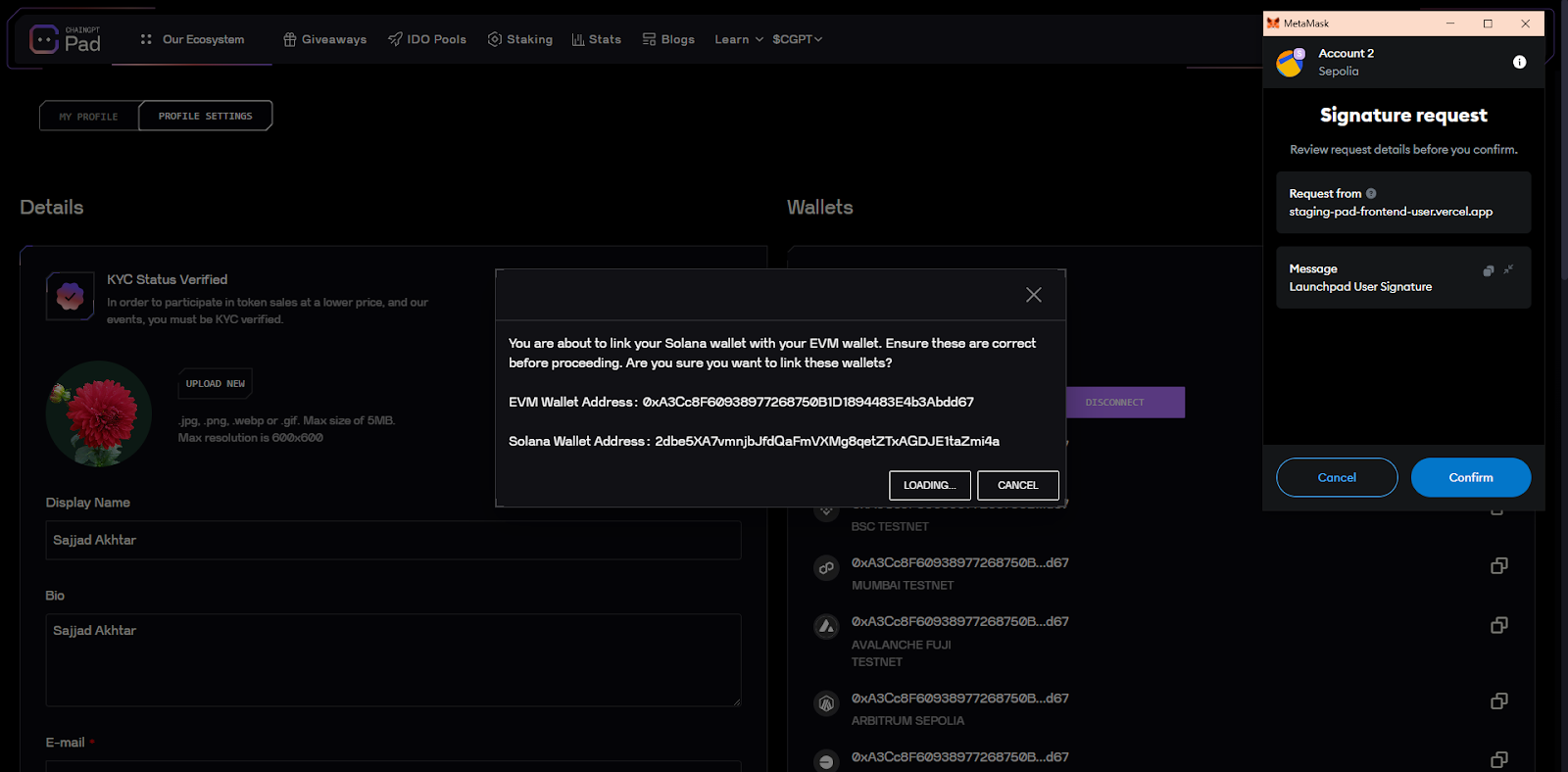
A drop-down will appear, showing the address associated with your Solana Wallet. Click “Link Solana Wallet”.
Sign the transaction in MetaMask and ensure the address matches yours correctly.
You have now successfully linked your Solana wallet with your EVM. You are also able to connect up to three Solana wallets per ChainGPT Pad profile
### Step 3 - Getting Involved with Solana Pools
You’re now fully connected. The next thing you want to do is get involved with the Solana pools on ChainGPT Pad.
Firstly, log out of your EVM wallet by clicking on the address at the top right corner. A box will appear; click “**Disconnect**.”
Switch from Ethereum to Solana. Then click “**Connect** **Wallet**” and choose your Solana-based wallet. Select Solana as the chain for your wallet.
You are now ready to get involved with Solana pools and claim your tokens!
Only once all the steps above are completed can you begin participating in IDOs and claiming tokens on ChainGPT Pad.
If you have any questions, you can reach out to us on the official [**ChainGPT Telegram channel**](https://t.me/ChainGPT).
---
# Agent Instructions
This documentation is published with GitBook. GitBook is the documentation platform designed so that both humans and AI agents can read, navigate, and reason over technical content effectively. Learn more at gitbook.com.
## Querying This Documentation
If you need additional information that is not directly available in this page, you can query the documentation by asking a question.
Perform an HTTP GET request on the following URL with the `ask` and `goal` query parameters:
```
GET https://docs.chaingpt.org/our-ecosystem/chaingpt-pad/one-wallet-connect-unified-wallet-integration-guide-evm-and-solana.md?ask=&goal=
```
`ask` is the immediate question: it should be specific, self-contained, and written in natural language.
`goal` is what the user is ultimately trying to achieve, the reason they need the answer. Sharing it helps GitBook give you a better, more relevant answer. A goal is most helpful when it describes the outcome the user wants rather than restating the question. For example, with `ask=how do I create an API token`, a goal like `automate deployments from our CI pipeline` lets GitBook tailor the answer to that use case.
The response will contain a direct answer to the question and relevant excerpts and sources from the documentation.
Use this mechanism when the answer is not explicitly present in the current page, you need clarification or additional context, or you want to retrieve related documentation sections.